Your dev machine,
in your pocket.DSH Tether — remote mobile access to DeepSeek Harness (dsh) from your phone
With a machine: a direct link across networks, no server to run, no shared Wi-Fi, relay only if hole-punching fails. Without one: DSH runs on the phone itself.
Android · iOS beta · MIT · verified against dsh 0.1.0-rc.7 / rc.8 / 0.1.2 / 0.1.5 / 0.1.6-alpha / 0.1.7-rc / 0.2.0-rc / 0.2.1-alpha / 0.2.1-rc / 0.2.2-alpha / 0.2.2-rc.1 / rc.3
An independent community project. Not a DeepSeek product, and not affiliated with or endorsed by DeepSeek.
MeasuredPhone with Wi-Fi off on 5G only, machine on home broadband: the two ends still punched through to each other and the relay was never used.

Peer to peer · end-to-end encrypted
a server you would run
GET STARTED
Two devices, three steps
A plugin on the machine, an app on the phone, one line pasted across. After that the app connects by itself. No machine? Tap Run on this phone on the Hosts page and DSH runs on the phone itself (bundled in the arm64 build; the first start unpacks the runtime in about 9 seconds).
- 01Machine
Add the plugin
In the desktop app, search dsh-plugin-tether on the sidebar Plugins page, install it and enable it — no terminal needed. The command below is for running dsh web yourself. It carries a small Rust sidecar that owns the iroh connection, shipped as one package per platform; installing pulls only the one matching your system.
dsh plugin --profile web add dsh-plugin-tether - 02Phone
Install it on the phone
The Android APK is signed — install it directly; the button hands you the arm64 build, which every phone from the last decade takes. iOS is an unsigned beta, see the note below.
- 03Both
Paste one line
Open dsh on the machine as you normally would (the desktop app or a dsh web you run yourself) and click Connect phone at the bottom of the sidebar for a pairing string; on the phone, Add computer, paste the whole line. It stays valid for 10 minutes.
a6081f56…b5809d6509#219230
The DSH desktop app has a Plugins page in its sidebar: open it, search for dsh-plugin-tether (or install it by name) and enable it — no terminal involved. The desktop app owns its profile, so the command above applies only when you run dsh web yourself. Once installed, Connect phone appears at the bottom of the sidebar.
The IPA is unsigned — sign it yourself with AltStore, Sideloadly or similar; an app signed with a free Apple ID expires after 7 days. It has only ever been built in CI and never run on a real device, because this project has no Mac. Android is the one verified on real hardware. Please open an issue if you hit anything.

WHY DIRECT
No relay to configure, no shared Wi-Fi
Reaching your own dev machine from a phone usually asks for one of three things: both ends on the same LAN, a port you forward or a Tailscale network you set up, or a relay you deploy and trust. Hole-punching through iroh asks for none of them.
| Works across networks | Needs a server | Needs setup | Works without a machine | |
|---|---|---|---|---|
| DSH Tether | yes | none | none | yes (Android local mode) |
| sorsama + dsh-relay | forward a port yourself | none | yes | no |
| ds-harness-remote | yes | sign in to its service, or self-host | yes | no |
| DSH Desktop | set up Tailscale yourself | none | configure Tailscale | no |
| Termux-based | — | none | a Linux userland | yes (inside Termux) |
If you want the most complete client, use sorsama — it is done well, and with the same author's dsh-relay it reaches you from outside your network too, at the cost of forwarding a port yourself. What differs here is the direct link: no router to touch, and no relay to deploy or trust. And if you only use your phone on the same Wi-Fi as your machine, you do not need any of this — a LAN setup is simpler.
THE INTERFACE
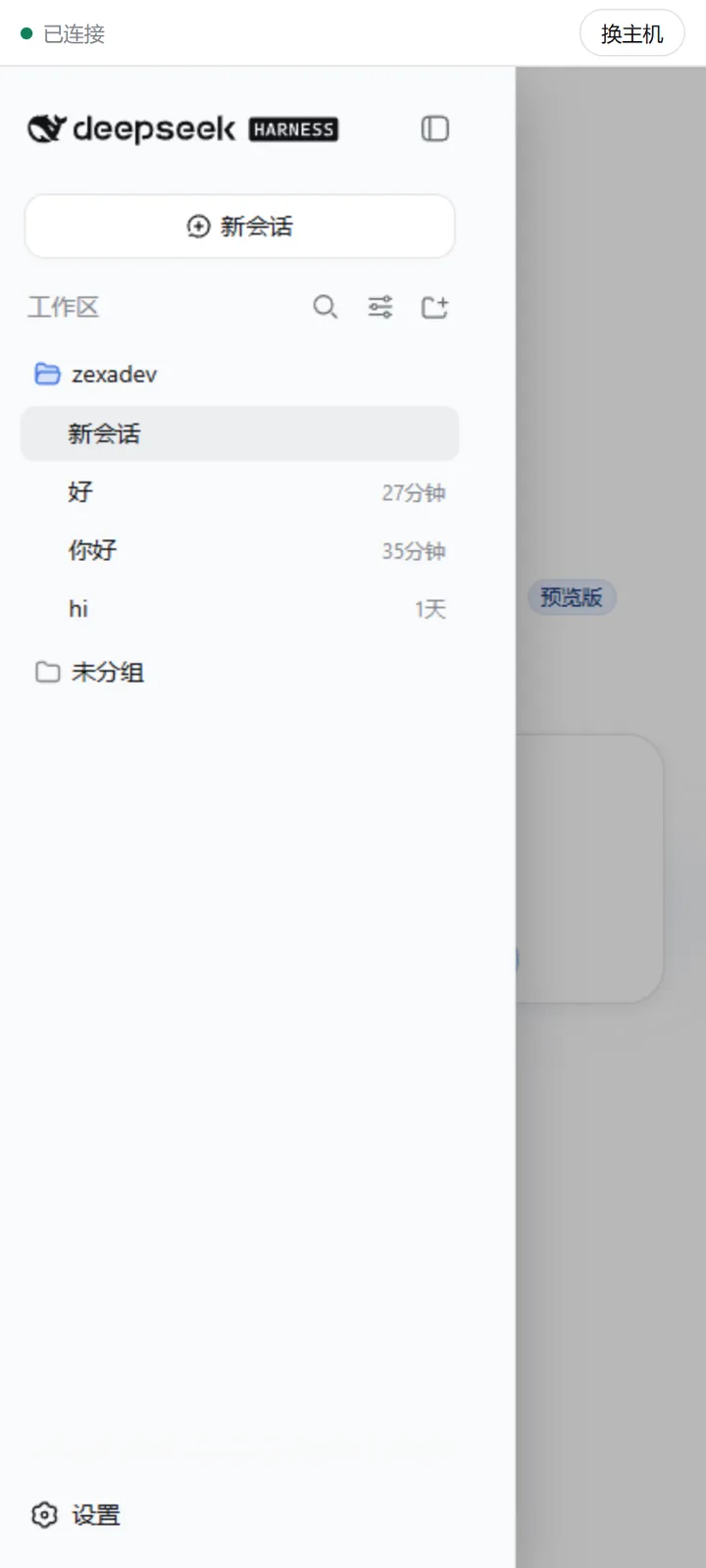
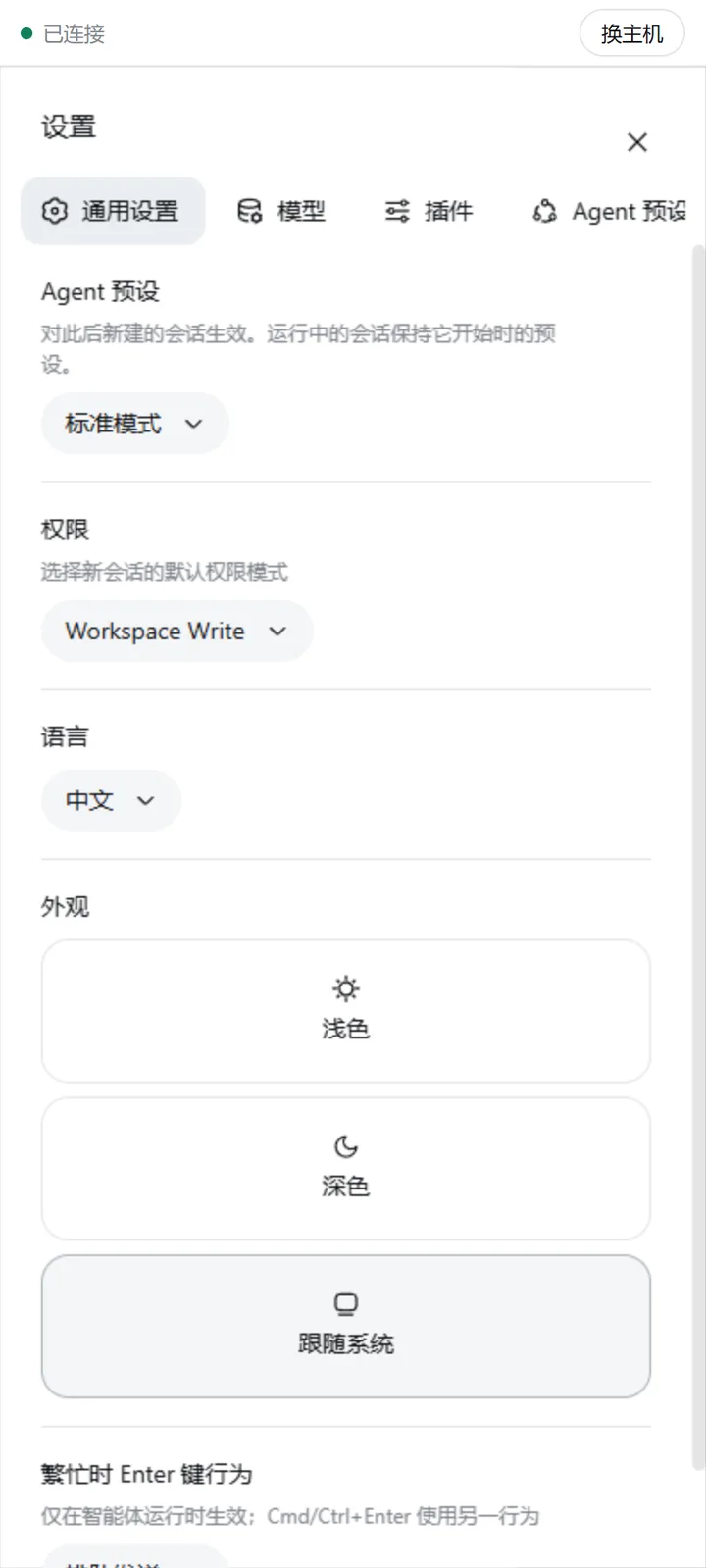
What runs on the phone is DSH's own interface
Not a reimplementation: conversations, tool calls, approvals and settings are all there. The narrow-screen fit comes from minimal injected styles, leaving upstream untouched.
Several machines
My computers keeps every machine you have paired: switch, rename, remove. Changing machines never means re-entering credentials.
Approval notifications
When the agent waits on your approval, the phone raises a system notification. You approve inside DSH's own interface — this plugin deliberately does not answer for you.
English and Chinese
There is no language switch. The phone app follows your phone's system language, what the plugin and its sidecar print in your terminal follows the computer's, and the parts injected into the DSH interface follow DSH's own language setting — flip that in DSH settings and they change with it.
Files land on the phone
Tap Download on a file, attachment or image in a session and it goes straight to the phone's Downloads folder, with a notification that opens it. No storage permission on Android 10 and later.
Stays connected with the screen off
A keep-alive service holds the link while the app is in the background, and on Android you can turn on "Stay connected with the screen off" so long screen-off periods do not drop it. It uses more battery and is off by default.
Answers sized for the phone
In sessions you message from the phone, the agent knows you are on a small screen: the answer first, short paragraphs, no wide tables. Send from the computer again and it goes back to normal.
SECURITY
How "no third party" actually holds
End-to-end encrypted
iroh encrypts the link over QUIC/TLS. When hole-punching succeeds it touches no third party; when it falls back, the relay only carries ciphertext it cannot read.
Pairing resists a man in the middle
The code is 6 CSPRNG digits, valid 10 minutes, 3 attempts per window. After pairing, access is granted by the phone’s iroh public key, which iroh’s TLS verifies and nobody can forge.
Unpaired peers get nothing
Proxy streams are only served on a connection that already completed the control-stream handshake; an unpaired connection may send at most 512 bytes before being rejected.
Same browser-trust rules as dsh
The plugin's own two HTTP routes apply what dsh applies to /api: the Host must be a loopback authority, an explicit cross-site marker is refused, and an attached Origin must match the Host.
Those rules stop a browser from being used as a confused deputy; they do not stop a local process. A local process presents a loopback Host, so it can mint a pairing code and pair itself as a "phone" — meaning an attacker who can already run code on your dev machine can turn that into long-term access. Do not run this plugin on a machine where you run untrusted code.
Give it a try
Verified against dsh 0.1.0-rc.7 / rc.8 / 0.1.2 / 0.1.5 / 0.1.6-alpha / 0.1.7-rc / 0.2.0-rc / 0.2.1-alpha / 0.2.1-rc / 0.2.2-alpha / 0.2.2-rc.1 / rc.3. dsh is in developer preview — check this line before assuming a newer dsh works; from 0.1.7 dsh refuses outright to install a plugin whose declared range does not cover it.
MIT, no accounts, no backend, nothing collected.